

If your estate documents are spread across a desk drawer, a filing cabinet, and several online accounts, would someone you trust know where to look? Learning how to organize estate documents isn’t just about putting papers in one folder. It means creating a clear inventory, protecting important originals, and recording where they can be found without giving everyone access to private information.
You may already know that a will, financial records, and health care instructions need to be kept safe. The challenge is helping trusted people locate the right document when it matters and tell whether they have the current version. A simple system can make that easier without requiring you to keep every original in one place.
This guide explains how to sort records by purpose, note where originals and copies are kept, and decide who should have access to key information. You’ll also learn how to set a manageable review routine and create a will-location record. Locate My Will helps you record where your will is physically kept and manage authorized searchers, while the document itself stays in your chosen storage location.
Key Takeaways
- Learn how to organize estate documents with an inventory that tracks each record’s purpose, location, access, and review date.
- Use matching categories and consistent labels to make paper folders or digital directories easier to navigate.
- Compare storage options and decide how to protect originals while making their locations discoverable to trusted people.
- Set a practical review reminder so your index stays aligned with changes to your family, property, or documents.
- Understand how a will-location record can help verified authorized searchers find the will without storing a digital copy.
How to Organize Estate Documents: Start With a Complete Inventory
An estate-document system tracks what records you have, where they’re kept, who may need access, and when you’ll review the information. The inventory is an index of those records and their locations, not a replacement for the documents themselves.
This distinction matters. The inventory helps you identify and locate a will or policy; it doesn’t contain the will’s terms or serve as a legal plan. Estate planning involves anticipating and arranging for the management of a person's estate during their life and in preparation for future incapacity or death. An inventory supports that broader planning by making relevant records easier to identify.
Which estate documents belong on the inventory?
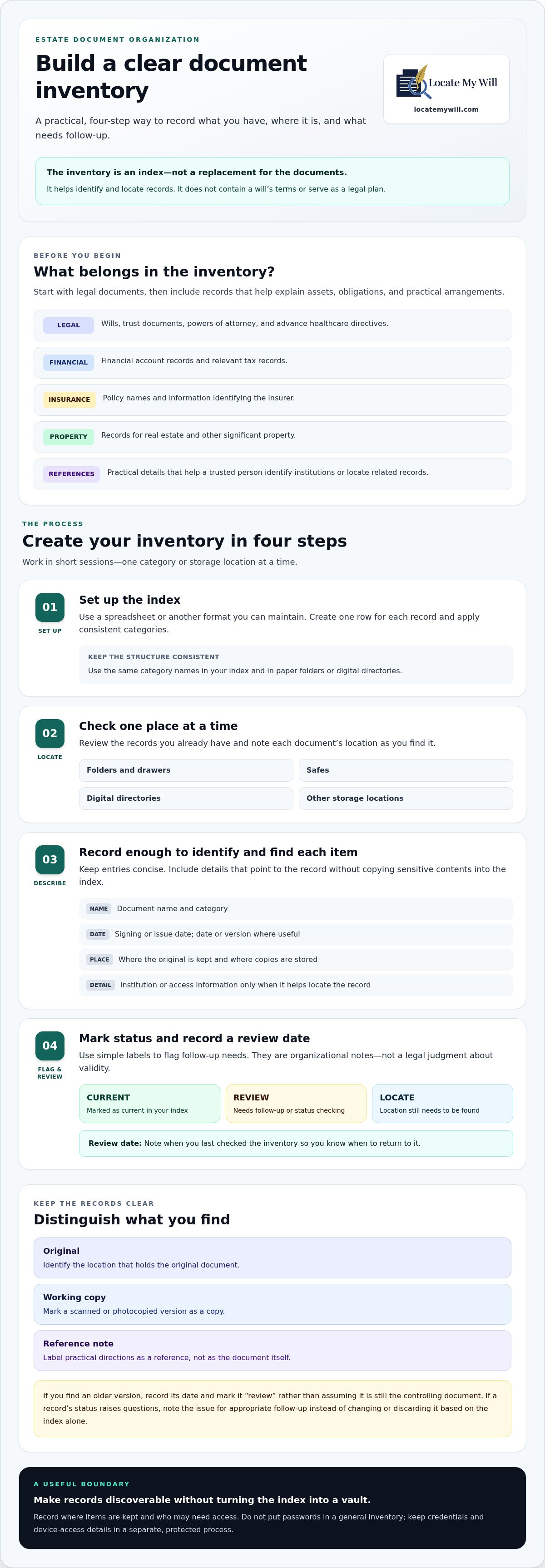
Start with legal documents, then include records that help explain your assets, obligations, and practical arrangements. Use categories such as:
- Legal: wills, trust documents, powers of attorney, and advance healthcare directives.
- Financial and tax: financial account records and relevant tax records.
- Insurance: policy names and information identifying the insurer.
- Property: records for real estate and other significant property.
- Practical references: details that help a trusted person identify institutions or locate related records.
You don’t need to duplicate every file or record sensitive account credentials in the index. Include enough detail to identify and find each item: its name, date or version, institution if relevant, physical or digital location, and access information for the appropriate person.
How should you begin a document inventory?
Gather the records you already have before deciding whether anything is missing or outdated. Work in short sessions, such as one category or storage location at a time. This makes the task manageable and gives you a more reliable picture than trying to recall every document from memory.
- Set up the index. Use a spreadsheet or another format you can maintain. Create a row for each record and use consistent categories.
- Check one place at a time. Review folders, drawers, safes, and relevant digital directories. Record each document’s location as you find it.
- Add a simple status. Mark items “current,” “review,” or “locate.” These labels flag follow-up needs without making a legal judgment about whether a document is valid.
- Record a review date. Note when you last checked the inventory so you know when to return to it.
This is an organizational checklist, not legal advice or a complete legal plan. If a record’s status raises questions, note the issue for appropriate follow-up rather than changing or discarding the document based on the index alone.
How to Sort Estate Documents by Purpose and Keep the Index Useful
Once you’ve listed your records, give the inventory a structure you can maintain. Arrange paper folders or digital directories to match its categories, such as Legal, Financial, Insurance, Property, and Medical. Use the same category names in the folders and index so an entry like “Trust document” points clearly to the right place.
Choose one naming pattern and use it consistently. For example, a file might be named Trust-2024-06-15-Review, with the document type, date, and status visible at a glance. Clear labels reduce guesswork, especially when records are kept in more than one place.
What information should each index entry include?
Keep each entry concise but useful. Record the document name, signing or issue date, where the original is kept, and where any copies are stored. Add an institution or contact role only if it helps someone identify or locate the record. The American College of Trust and Estate Counsel (ACTEC) offers guidance on essential estate-planning documents and the roles of executors and trustees, which can help you recognize relevant terms as you build your index.
Distinguish among originals, working copies, and reference notes. Identify which location holds the original, mark a scanned or photocopied version as a copy, and label practical directions as a reference. If you find an older version, record its date and mark it “review” rather than assuming it is still the controlling document. The index should point to records, not reproduce sensitive contents unnecessarily.
How should you organize digital estate records?
Mirror your paper categories in access-controlled digital folders. If you are converting physical paperwork into digital files, mobile tools like Scantrix allow you to generate clean PDFs directly on your mobile device, and you can explore Premium App Subscription Fees to compare advanced capture and export options. Use predictable file names and include a date or status where it helps distinguish versions. In the index, record the account or institution name and general recovery instructions, but don’t put passwords in a general inventory. Keep credentials and device-access details in a separate, protected process, and make sure trusted people know how to find that process when appropriate.
Think of the index as a directory, not a vault. Limit sensitive details to what someone needs to find the record, and review access as circumstances change. A practical answer to how to organize estate documents includes consistent files and labels, as well as a deliberate boundary between location information and private contents.
For a will, you can make its location discoverable without placing the document itself in an index or online record. Locate My Will’s will-location record records where the physical will is kept and manages authorized searchers, helping the right people find its location.
Where to Keep Estate Documents: Balance Security With Access
Choosing a storage location means balancing protection with practical access for the right person. The best arrangement depends on the documents, your household, and who may need access. A home safe can keep papers together and close at hand, but consider who knows how to access it and what could happen if you move or someone else manages the home. Copies held by an attorney or fiduciary may provide another reference point, though they don’t replace a clear record of where the original is kept. Institutional storage may offer protection, but access procedures can affect how someone retrieves a document.
Storing a document means keeping the document itself in a chosen place; recording its location means noting where it can be found without storing it there. That distinction lets you protect private records while giving trusted people practical directions.
How do you choose a practical storage arrangement?
Compare each option against four considerations: protection from loss or damage, protection from unauthorized access, ease of retrieval, and how well it will work if your household circumstances change. An arrangement that feels secure to you may be difficult for someone else to access. Record the location and any necessary retrieval instructions in your index, then revisit them after a move or other significant change.
Originals and copies can serve different purposes. A copy may help someone identify a document or understand where to look, while an original may be needed for a particular process. Don’t assume every document follows the same rule: requirements can vary by document and jurisdiction. Safe-deposit-box access and rules relating to wills can also vary by state and circumstance, so consider those details when deciding where an original belongs.
How can trusted people find the location without receiving every document?
Give clear location instructions to people whose roles make access appropriate. You might tell a trusted representative which safe or institution holds a record while keeping the document’s contents and other private information restricted. Share only what is needed for retrieval, and update the instructions if a document is moved.
A will-location registry provides a separate record of where a will is physically kept. It points to the document; it isn’t digital document hosting or physical storage. For more guidance on this distinction and practical access considerations, see Register Will Location Online: Estate Security Guide.
As you decide how to organize estate documents, create a clear path from the index to each record and limit access to the people who need it. Security and discoverability can work together when the location is documented separately from the document itself.
How to Maintain Estate Documents With Reviews and a Family Handoff
An inventory is useful only while its details remain accurate. A move, a change in family circumstances, a new property, or an updated document can make an old location note or contact name misleading. Build reviews into your system so trusted people aren’t left relying on outdated directions.
When should you review your estate-document system?
Set a review date and add a reminder to your index. There’s no single legal review interval that suits everyone, so choose a routine you can maintain and revisit the system after significant changes. Check document dates and status, named roles, contact details, and where originals and copies are kept. Update the index when something changes, then record the date you checked it.
Keep version history clear. If a newer document replaces an older copy, label the older one “superseded” and note where the current version is located. Don’t destroy older records automatically; retention needs can depend on the document and your circumstances. If you’re unsure what to retain or which version should be relied on, keep that question separate from your organizational updates and seek appropriate guidance.
Retrievability matters: a document that exists but can’t be found may be difficult for beneficiaries or representatives to use. For more context, read about the consequences of a lost will for beneficiaries.
What should a family handoff include?
Tell appropriate people where the index is and how its categories and status labels work. Explain who should retrieve each original, where it is kept, and whom to notify if the record has moved or appears outdated. Share only the directions and information each person needs for their role, and update the handoff when responsibilities or locations change.
A handoff can also clarify that finding a will and deciding what to do after a death are separate tasks. For a step-by-step overview of the search process, see how to find a deceased person’s will.
A Locate My Will subscription lets you record your will’s physical location, manage authorized searchers, and set activation dates that control when searches and notifications can occur. It records location information, not the will itself. Include the location record in your wider system and review routine.
How a Will-Location Record Fits Into Your Estate-Document Plan
Your inventory can point to a will’s location, but a separate will-location record can make that information easier to manage for the people you authorize. It records where the physical will is kept, not its contents or a digital copy. This adds a location-management layer to your wider estate-document plan without moving the original or replacing your inventory.
What does a will-location registry do?
Locate My Will records the physical location of your will and manages authorized searchers and notification recipients. Only verified authorized searchers can access the recorded location information. You can designate up to three authorized searchers and three notification recipients, keeping access and notifications distinct from the document itself.
Search activation dates control when searches can be performed and notifications can be sent. This lets you specify not only who may receive location information, but also when searches and notifications may occur. Keep the location record current if you move the will, and include it in your document index so it remains part of the system you review.
The platform doesn’t host digital wills or store physical originals. You choose where the will is kept; the registry records that location. The registry helps authorized people find the original, while the will remains in your chosen storage location. It complements the inventory rather than replacing it, and it doesn’t draft documents or serve as a complete estate plan.
How can you take the next step?
First, complete your inventory and confirm where the current will is physically kept. Then consider which trusted people need location information and which should receive notifications. Keep those roles intentional. A person who receives a notification isn’t necessarily an authorized searcher.
When recording the will’s location, review the searcher and recipient designations, along with the activation-date settings that govern when searches and notifications can occur. Add the location record to your index and include it in your regular review so any change to the will’s storage location is reflected in both places.
A clear, maintained location record can bridge the gap between protecting an original and helping the right people find it when needed. Record your will’s location with Locate My Will as one practical part of how to organize estate documents.
Make Your Estate-Document System Ready for the People Who Need It
A reliable system doesn’t require every original to sit in one place. Start with an inventory that identifies records and locations, use consistent labels to distinguish current documents from older versions, and give trusted people clear instructions for finding what they need. A review date helps keep details current as your documents, family circumstances, or storage locations change.
As you consider how to organize estate documents, remember that privacy and discoverability can work together. A will-location record adds a focused layer to your plan: verified authorized searchers can access the recorded location information, while activation dates control when searches and notifications can occur. You can designate up to three authorized searchers and three notification recipients.
If your inventory is in place and you’re ready to make your will’s location easier to find, record your will’s location with Locate My Will. Add the record to your document system so trusted people have a clear path to the will’s location.
Frequently Asked Questions
How do I start organizing my estate documents?
Start with an inventory of the documents you already have, then record each item’s name, date, location, and status. Group records by purpose, such as legal, financial, insurance, property, and medical. Work through one folder or storage location at a time, and mark items “current,” “review,” or “locate” as appropriate. This makes how to organize estate documents feel manageable without requiring you to move every original.
What documents should be included in an estate-document organizer?
Include wills, trust documents, powers of attorney, and advance healthcare directives, along with relevant insurance policies, financial account records, property records, and tax documents. Add practical reference details if they help someone identify an institution or find a record. The organizer should point to documents rather than duplicate every file or store sensitive contents. Record dates and locations so you can distinguish items and follow up on anything that needs review.
Where should I keep original estate documents?
Choose a location that balances protection with practical access for the appropriate person. Options may include a home safe, copies held by an attorney or fiduciary, or institutional storage. Each has different access considerations, so note where originals and copies are kept and how retrieval works. Rules and procedures can vary by document and state, including safe-deposit-box access and will requirements. Avoid assuming one storage method is right for every record.
Should I give my family copies of my will?
That depends on your preferences, the roles of your family members, and the document’s handling needs. You might share a copy or provide clear instructions about where the original is kept without distributing the document broadly. Make sure the person who may need to locate it knows how to find the relevant information. Copies can become outdated, so identify their dates and avoid letting an older version be mistaken for the current one.
How often should I update my estate-document organizer?
Set a review reminder you can maintain, and revisit the organizer after a major family, property, or document change. Check document dates and statuses, named roles, contact details, and storage locations. There isn’t one review interval that suits every person or situation. If a newer document replaces an older copy, label the older version clearly and note where the current one is, rather than assuming older records should be destroyed.
Does a will-location registry store a copy of my will?
No. Locate My Will records where your physical will is kept; it doesn’t host a digital copy or store the original. Verified authorized searchers can access the recorded location information. Users can designate up to three authorized searchers and three notification recipients, and activation dates control when searches and notifications can occur. The registry is a location-management layer that complements your estate-document organizer, not a replacement for the will itself.


