

Review the people authorized to locate your will after a birth or adoption, just as you review the plan itself. Updating authorized searchers for your will during a regular review helps keep the record aligned with your family’s needs. If you use a biennial review schedule, make it a reminder so outdated names or details don’t remain in place when someone needs to find the will.
A growing family brings new responsibilities, and the will’s provisions may be the first thing you review. It’s also important to keep the right people authorized to locate it. This article explains why a birth or adoption is a useful time to review searchers, what an outdated record can mean, and how to keep your will’s location information connected to the people you trust.
Key Takeaways
- After a birth or adoption, review both who is named in your will and who can help locate it.
- Keep authorized searcher details current during your biennial review so an outdated record is less likely to cause confusion.
- Understand that permission to search for a will is separate from the legal authority to make decisions under it.
- Consider a will-location registration service to record where your will is kept and manage authorized searchers and search timing.
Birth or adoption of children
A birth or adoption changes the people your estate plan is meant to protect. Review the will’s guardian nomination, beneficiaries, executor, and authorized searchers as one coordinated task. If a will doesn’t name a guardian for minor children, your wishes about their care may be less clear. That decision is separate from locating the will, but both depend on clear, current records. Updating authorized searchers for your will helps the people you trust know how to find the document when needed.
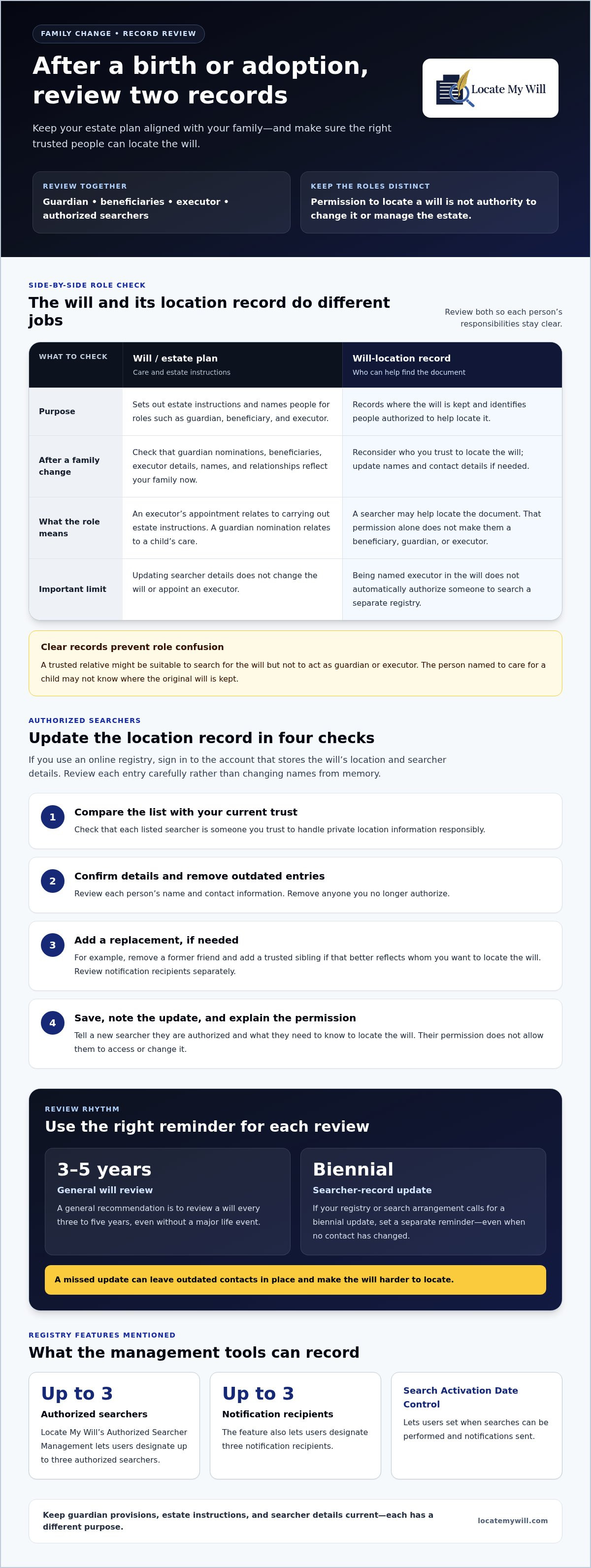
Compare the will with your current family situation. For example, a will created before a child arrived may name only a spouse or other relatives as beneficiaries. It may also leave the executor without clear instructions about the intended distribution of assets. Naming a guardian, reviewing beneficiaries, and confirming the executor’s details are legal-document matters. Authorized searcher records serve a different purpose: they identify people who may help locate the will, not people who can change it.
Keep these roles distinct. A trusted relative might be suitable to search for the will but not to act as guardian or executor. The person named to care for a child, in turn, may not know where the original will is kept. After an adoption, check that names and relationships in the will reflect your family as it is now. Marriage, a new spouse, or a change in whom you trust may also prompt a review.
Set a regular review alongside major family changes. A general recommendation is to review a will every three to five years, even without a major life event. If your registry or search arrangement calls for a biennial update, set a separate reminder to refresh the authorized people on that schedule. A missed review can leave outdated contacts in place and make the will harder to locate. Keeping guardian provisions, estate instructions, and searcher details current helps your family understand each person’s role.
How do I update the people authorized to search for my will?
Start with the record of your will’s location and authorized searchers. If you use an online registry, sign in to the account that holds those details. Review each person’s name and contact information, then remove anyone you no longer authorize. Updating authorized searchers for your will changes who may help locate it; it doesn’t change the will or appoint an executor.
Review each entry carefully rather than changing names from memory. Work through these checks:
- Compare the current searcher list with the people you trust to act responsibly.
- Confirm each person’s contact details and remove outdated entries.
- Add a replacement searcher if needed, then review any notification recipients separately.
- Save the revised record and note when you completed the update.
For example, if a former friend is listed but a trusted sibling is now better suited to locate the will, remove the former contact and add the sibling. Tell the new searcher they are authorized and explain what they need to know to locate the will. Authorization to search does not give them authority to access or change it.
Set a reminder for the biennial update period, even when no contact has changed. A missed update can leave old details in the record, so a search may rely on someone you no longer intend to authorize. Locate My Will’s Authorized Searcher Management lets users designate up to three authorized searchers and three notification recipients. Its Search Activation Date Control lets users set when searches can be performed and notifications sent. If you want a structured way to maintain those records, consider authorized searcher management as part of your will-location planning.
Who can authorize a search for a will in the United States?
The will owner decides who may search a will-location record. That permission identifies people who can help locate the document; it doesn’t make them beneficiaries, guardians, or executors. For example, an owner might authorize a trusted sibling to locate the will without giving that person authority over estate assets.
Keep the roles separate. The person who creates or updates a registry record manages its authorized searchers. The executor named in the will has a different role in carrying out estate instructions. Being named executor doesn’t automatically make someone an authorized searcher in a separate registry. Likewise, permission to search doesn’t change the will or appoint someone to manage the estate.
After the will owner dies, authority over the estate may involve the executor or another personal representative. Their role concerns the estate and the will, while access to a private registry follows that service’s procedures. A listed searcher may help identify where the document is, but that listing alone doesn’t establish authority to act for the estate. The will, probate process, and registry record serve distinct purposes.
Consider a parent who names a cousin as executor but authorizes a sibling to search the location record. The cousin and sibling have different responsibilities: the cousin’s appointment relates to administering the estate, while the sibling’s authorization relates to locating the will. Clear records help prevent one role from being mistaken for the other.
To keep permissions clear, the will owner should:
- Choose searchers trusted to handle private location information responsibly.
- Keep their names and contact details current in the relevant record.
- Tell each person what their search permission covers, and what it doesn’t.
- Review the will’s executor appointment separately from registry access.
If someone can no longer manage their own records, family members shouldn’t assume they can change registry permissions. The applicable record and access process determine how authorized searchers are maintained. Separating search access from estate authority makes each person’s responsibilities clearer.
How do I update authorized contacts with a will registry or document storage service?
First, identify where your will’s location and contact details are recorded. A will-location registry records where the original is kept; a document storage service holds the document itself. These are different functions. For example, changing a registry contact doesn’t move a will stored in a home safe or a lawyer’s office.
Use the account owner’s authorized process to make changes. Review each entry carefully, since a searcher, notification recipient, and executor have separate roles. Someone may receive a notification without being authorized to search. An executor named in the will doesn’t automatically become a registry contact.
For a reliable update, handle these details together:
- Confirm the will’s current location, such as a named office or home safe.
- Remove contacts you no longer authorize and correct any outdated details.
- Add the replacement searchers and review notification recipients separately.
- Save the changes, record the update date, and tell new contacts their role.
Then compare the record with the will’s actual location. If you move the original from a lawyer’s office to a safe, update the location as well as the contact list. Otherwise, searchers could have permission but inaccurate directions. Keep the registry record current, and let the executor know when the location changes.
Set a reminder for each biennial review, even if no contact or location has changed. A missed review can leave outdated searchers or directions in place. Keep a private note of when you reviewed the record and what you changed. A will-location registry records where the original is kept; it does not store the document itself.
For an online way to record a will’s location and manage authorized contacts, use Locate My Will’s searcher management. Its registration supports up to three authorized searchers and three notification recipients. Keeping those entries current connects the location record with the people you’ve chosen to help find the will.
Locate My Will: Will Owner Registration Subscription
Locate My Will’s Will Owner Registration Subscription lets you record where your will is located and manage search permissions. It can help keep your location details and chosen contacts together, especially after a family change or during a scheduled review.
With Authorized Searcher Management, you can designate up to three authorized searchers and three notification recipients. These roles help keep search access and notifications organized; they don’t change your will or store the physical document. Search Activation Date Control lets you set when searches can be performed and notifications sent.
Locate My Will records your will’s location and manages the people connected to its search record. It doesn’t draft a will or provide physical document storage. To manage your will-location information and authorized contacts in one account, sign up for Locate My Will.
Make Your Next Review Easier
Make reviewing your will-location record part of your household planning routine. Pair it with another recurring task, such as organizing important documents, so it’s easier to remember. A calendar reminder can prompt you to confirm that the information still reflects your decisions.
At each review, consider whether your trusted contacts still understand what you expect of them. A brief, clear conversation can prevent confusion later, especially when family circumstances or responsibilities change. Explain how to locate the will and where its location record is maintained.
Updating authorized searchers for your will keeps the location record connected to the people you trust. Make your next review an intentional task rather than relying on memory.
For support managing your will-location record, contact Locate My Will. A clear next step can help you keep your plans organized with confidence.
Frequently Asked Questions
Does changing authorized searchers require updating the will itself?
No. Changing the people listed in a will-location record doesn’t amend the will’s legal provisions. Replacing a searcher, for example, doesn’t change who inherits assets or who is named executor. Keep the location record current separately. If you want to change guardians, beneficiaries, or other instructions in the will, review the legal document separately.
How much do will registry or authorization updates cost?
Locate My Will requires a paid subscription for its core features. You can update your will’s location, authorized searchers, notification recipients, and search activation date without an additional charge. A subscription term is capped at five years and can be renewed. Before searching, authorized searchers must verify their identity with an unexpired state-issued driver’s license or another government-issued ID.
How do state laws affect access to a will and authorized searchers?
Access to a will-location record follows the registry’s procedures, while authority over an estate is separate. A listed searcher may help locate the will but does not thereby gain authority to act for the estate.
What information or documents are needed to add or remove an authorized searcher?
Use the record owner’s authorized process, such as signing in to the account that holds the details. Review names and contact information, remove outdated searchers, add replacements if needed, and review notification recipients separately.
What are the risks of giving someone access to a will before death?
A searcher’s permission is limited to helping locate the will; it doesn’t authorize them to access or change it or manage the estate. Choose people who will handle private location information responsibly, and explain the limits of their role.


